1257L M1 Tax Code Explained: Emergency Tax Guide for 2026/27
1257L M1 tax code explained for 2026/27, with emergency tax calculations, refund examples, and practical steps to correct your code.
1257L M1 Tax Code Explained: Emergency Tax Guide for 2026/27
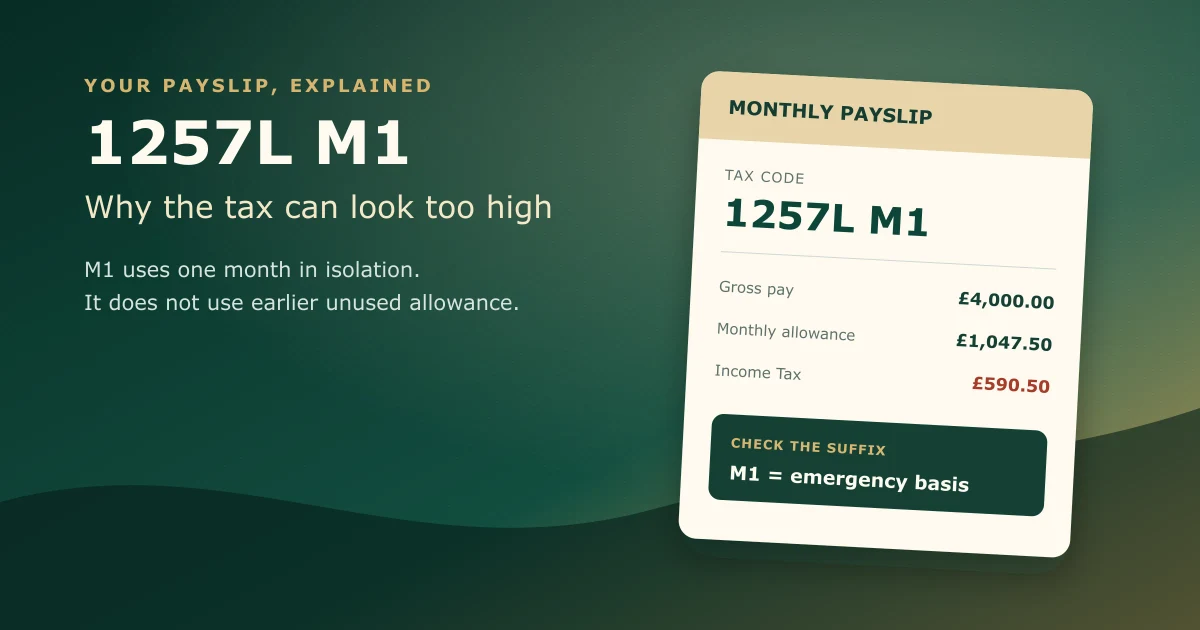
A 1257L M1 tax code means your employer is giving you the standard monthly Personal Allowance but calculating tax from this pay period alone. It does not look back at unused allowance or tax from earlier months in the tax year. That small M1 suffix can make a large difference to your payslip.
For the tax year from 6 April 2026 to 5 April 2027, the standard Personal Allowance remains £12,570. A normal cumulative 1257L code spreads that allowance across the year and adjusts for what has already happened. A 1257L M1 emergency tax code uses only one month’s share, £1,047.50, each time payroll runs.
That may be correct for a short period. It may also mean you pay too much tax after starting a job, receiving a company benefit, drawing a pension, or moving between payroll records. The important job is to check why the code was issued, not simply assume that every emergency code is wrong.
Quick answer:
1257Lgives the standard £12,570 Personal Allowance.M1tells payroll to treat each month separately. HMRC says emergency codes can be shown as W1, M1, X, or NONCUM. If you started a job without complete previous pay and tax details, the code is usually temporary and HMRC says an update can take up to 35 days.
If your payslip has changed unexpectedly, our tax refund service can help check whether you have overpaid. Employers that need help applying codes and correcting payroll records can use our payroll service.
What does the 1257L M1 tax code mean?
The code has two parts, and both matter.
1257L is the standard code used for many people with one job or pension. HMRC turns the code number into a tax-free amount by adding a final zero, so 1257 broadly represents £12,570. The L means you are entitled to the standard Personal Allowance.
M1 means month 1 treatment. Your tax is calculated using the pay and allowance for the current month, without using earlier months in the tax year. Payroll software may show the same idea as Month 1, M1, NONCUM, or a non-cumulative marker.
HMRC’s tax code guidance confirms that 1257L is currently used for most people with one job or pension. Its separate emergency tax code guidance says codes ending in W1, M1, X, or NONCUM are emergency codes.
| Payslip code | What it usually means |
|---|---|
| 1257L | Standard Personal Allowance, normally operated cumulatively |
| 1257L M1 | Standard monthly allowance, current month assessed on its own |
| 1257L W1 | Standard weekly allowance, current week assessed on its own |
| 1257L X | Emergency treatment where pay dates vary |
| 1257L NONCUM | Another payroll description for non-cumulative treatment |
The number 1257 is not the problem by itself. It is often exactly right. The part that changes the timing is M1.
Our broader guide to the UK tax code 1257L explains the number and letter. The guide you are reading focuses on the emergency suffix and what it does to actual pay.
1257L M1 versus cumulative 1257L
PAYE normally works cumulatively. That means payroll looks at your total taxable pay and total allowance from the start of the tax year to the current payday. If you did not earn anything in April and May, the unused allowance for those months can still be available when you are first paid in June.
Under M1 treatment, April and May are ignored. June receives June’s share of the allowance, even if you had no earlier income.
For a monthly payroll, the standard allowance is divided like this:
| Point in tax year | Cumulative allowance available | Allowance used by M1 for that month |
|---|---|---|
| End of April, month 1 | £1,047.50 | £1,047.50 |
| End of May, month 2 | £2,095.00 | £1,047.50 |
| End of June, month 3 | £3,142.50 | £1,047.50 |
| End of July, month 4 | £4,190.00 | £1,047.50 |
| Full 2026/27 tax year | £12,570.00 | Twelve separate monthly amounts |
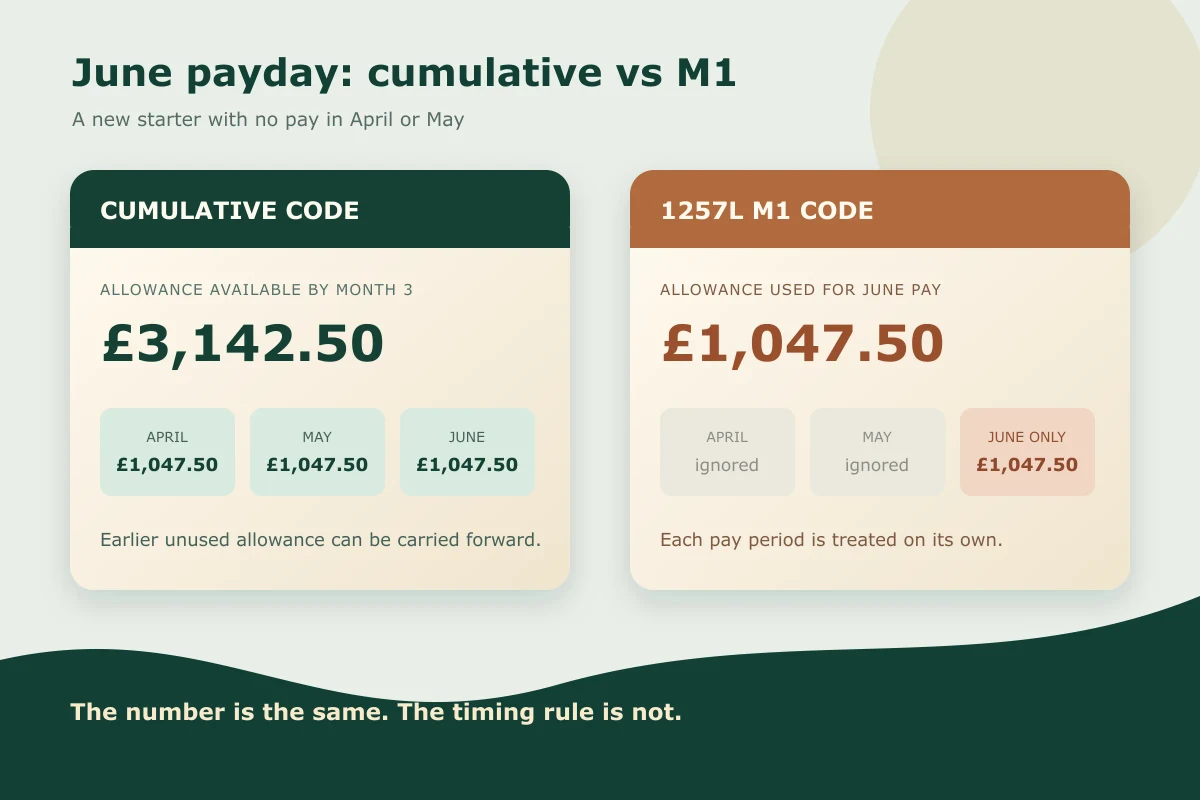
M1 does not remove your annual Personal Allowance. It changes how much of it payroll can use on each payday. Once HMRC issues a cumulative code, payroll may correct the position through a later payslip.
Worked example 1: £4,000 paid in June after two months without income
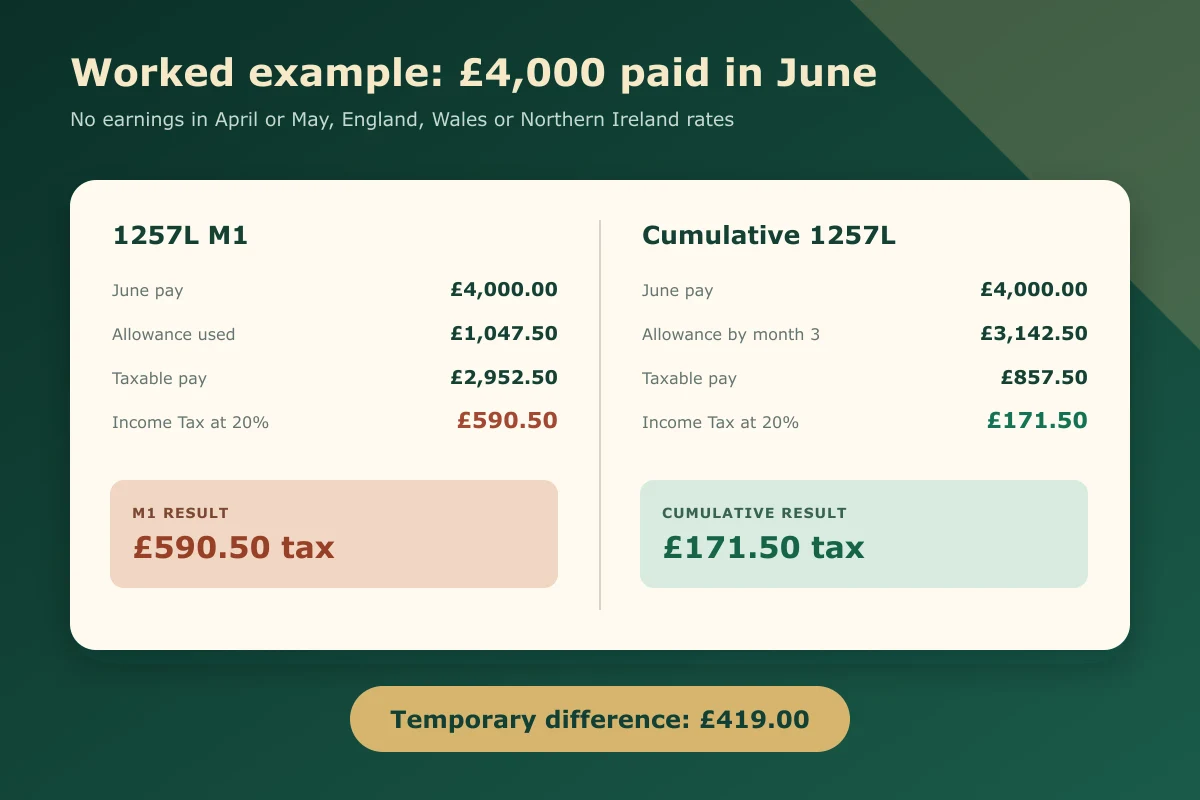
Assume you start a new job in June 2026. You had no taxable earnings in April or May, then receive gross pay of £4,000 in June. We will use the 2026/27 rates that apply in England, Wales, and Northern Ireland and ignore National Insurance, pension deductions, and student loans so the Income Tax effect is clear. A Welsh taxpayer’s code would normally carry a C prefix.
With 1257L M1:
- June gross pay: £4,000
- one month’s allowance: £1,047.50
- taxable pay: £2,952.50
- Income Tax at 20%: £590.50
With a cumulative 1257L code in month 3:
- total pay to date: £4,000
- allowance available to month 3: £3,142.50
- taxable pay to date: £857.50
- Income Tax at 20%: £171.50
The M1 calculation takes £419 more in this example. That is not a penalty. It happens because the emergency calculation cannot use the £2,095 of allowance that built up during April and May.
Your figures can differ because of Scottish tax rates, a reduced Personal Allowance, benefits in kind, earlier pay, pensions, or other deductions in your code. Treat the example as an explanation of the mechanism, not a personal tax calculation.
Why have I been put on a 1257L M1 emergency tax code?
The most common reason is incomplete information when a payroll record starts or changes.
You started a new job without a usable P45
A P45 records your leaving date, pay and tax so far in the tax year, and tax code. Your new employer uses it to bring the year-to-date figures into payroll.
If the new employer does not have those details, it cannot safely assume how much allowance you have already used. HMRC may place you on an emergency basis while the records catch up.
If your old employer did not provide a P45, ask for one. If it is lost, GOV.UK says you cannot get a replacement, so you should complete a starter checklist instead.
The starter checklist answer created temporary treatment
The starter checklist asks about other jobs, pensions, and work earlier in the tax year. The declaration you choose affects the code the employer uses before HMRC sends a formal coding notice.
An incorrect answer can make payroll treat a main job as an additional job, or treat previous pay as unknown. Do not guess to get the form finished. If the answer was wrong, tell payroll promptly and check your HMRC record.
HMRC is waiting for previous employment information
Your previous employer may have sent the leaving information late, used incorrect details, or left the employment open on HMRC’s system. Your new employer may also have submitted a starter record that does not match.
HMRC says it will usually update the code when it receives the details from the new and previous employers. For a new job, this can take up to 35 days from the start date.
You started receiving a company benefit or State Pension
An emergency code is not limited to new jobs. HMRC says you might receive one when you start getting company benefits or the State Pension. The code can help collect an estimated amount during the year while HMRC adjusts the record.
In that situation, the emergency basis may remain until the end of the tax year. Check that the benefit or pension amount in your tax account is sensible. An estimated company car, medical insurance benefit, or pension figure that is too high can reduce your allowance too far.
You have more than one job or pension
The Personal Allowance cannot normally be used in full against every employment and pension. HMRC may allocate 1257L to one source and use BR, D0, D1, or another code elsewhere.
If HMRC has assigned the allowance to the wrong job, the code can look strange even though the total allocation across all sources is the real issue. List every live employment and pension before asking for one code to be changed.
Payroll has not applied HMRC’s latest notice
Employers receive tax code instructions electronically through payroll systems. A notice can be missed if employee identifiers do not match, software retrieval is not run, or payroll has already closed for the period.
An employer should not invent a cumulative code because the employee says M1 looks wrong. Payroll needs valid starter information or an HMRC coding notice. Guessing can create an underpayment that returns later.
Does 1257L M1 always mean I have paid too much tax?
No. It means the current period was calculated without reference to earlier periods. Whether that creates an overpayment depends on your actual pay and tax history.
You may pay too much if:
- you had little or no taxable income earlier in the tax year
- you changed jobs and your unused allowance was not carried forward
- a large one-off payment is treated as if similar pay will arrive every month
- HMRC’s estimate of a benefit, pension, or other income is too high
You may pay the right amount, or even too little, if:
- you already used the allowance in another job
- an earlier employer deducted too little tax
- you have concurrent jobs or pensions
- your annual income is high enough for the Personal Allowance to be reduced
- HMRC is collecting tax on untaxed income or a benefit through the code
The suffix is a warning to check the calculation. It is not proof of a refund.
Worked example 2: a £7,000 June payment after £2,500 in April and May
Assume monthly pay was £2,500 in April and May, followed by £7,000 in June. Total pay by the end of June is £12,000.
On a cumulative 1257L code at month 3:
- cumulative allowance: £3,142.50
- cumulative taxable pay: £8,857.50
- cumulative Income Tax at 20%: £1,771.50
- tax already deducted for April and May at 20%: £581
- June tax needed to reach the cumulative total: £1,190.50
On 1257L M1, the June calculation uses only June’s bands and allowance. The first £1,047.50 is covered by the monthly allowance, the next £3,141.67 is broadly within the monthly basic-rate band, and the remaining amount falls into the 40% band for that pay period.
The June Income Tax is about £1,752.67 under M1, roughly £562.17 more than the cumulative June deduction in this simplified example.
This is why emergency tax is often noticed after a bonus, final payment, pension withdrawal, or high first salary. Payroll treats the pay period on its own, and a portion can enter a higher monthly band even where the cumulative year-to-date position would still be within the basic-rate band.
How to correct a 1257L M1 tax code
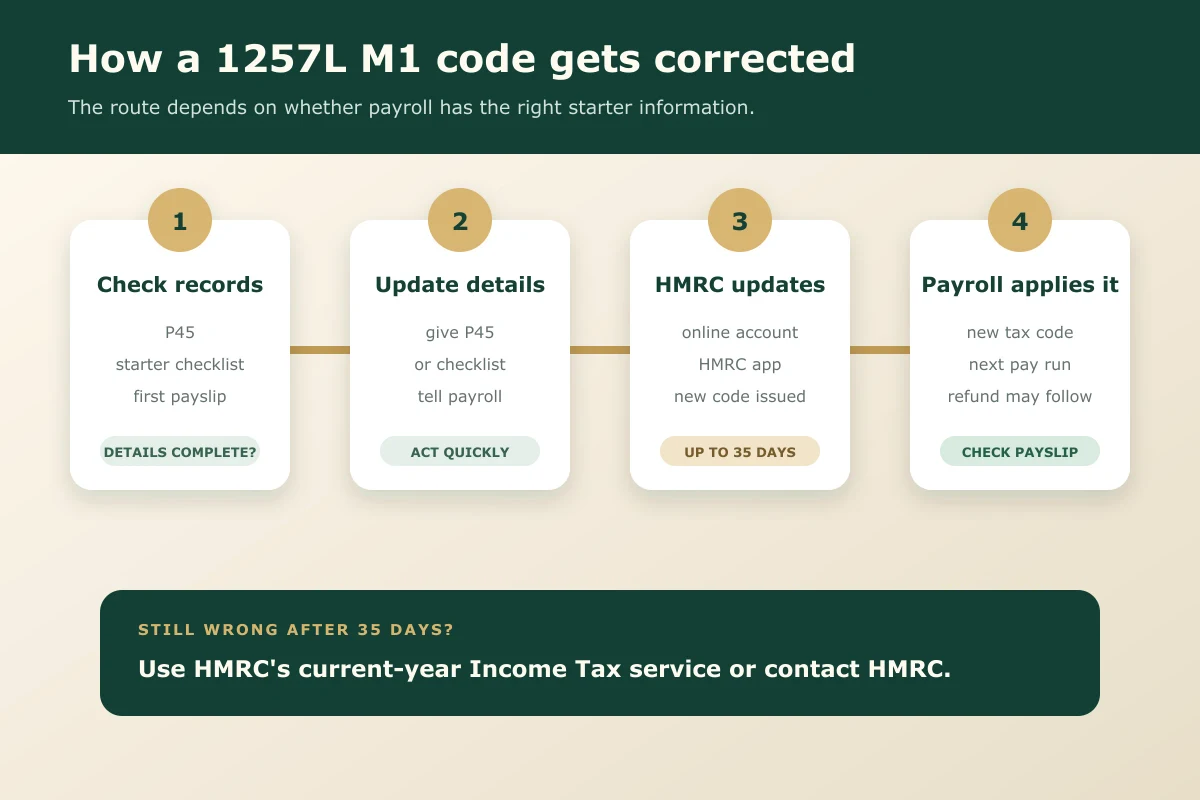
Start with the paperwork before contacting everyone at once. Most corrections fail because the employee, employer, and HMRC are looking at different versions of the employment record.
Check the code on your latest payslip
Confirm the exact code and suffix. 1257L without M1, W1, X, or NONCUM is not an emergency code. Payroll layouts vary, so the non-cumulative marker may sit in a separate column.
Also check:
- gross pay
- taxable pay
- Income Tax deducted
- pay and tax to date
- employer name and PAYE reference
- whether a previous employment still appears active in your HMRC account
National Insurance is calculated under separate rules. A tax code change does not normally recalculate employee National Insurance. Student loan and postgraduate loan deductions also follow their own thresholds.
Give your employer the P45 or starter checklist
If you have a P45 for this tax year and payroll can still use it, give it to your employer. If there is no P45, complete the starter checklist accurately.
GOV.UK’s P45 guidance says the form includes pay, tax, leaving date, and tax code. It also says HMRC should automatically correct a wrong code after the first pay when the new employer has the P45 details.
Keep a copy of anything you provide. If the code remains wrong, you need to know which figures payroll actually received.
Check your HMRC record online
Use HMRC’s current-year Income Tax service or the HMRC app. For 2026/27, the service covers 6 April 2026 to 5 April 2027.
You can use it to:
- check your tax code and Personal Allowance
- view estimated income from jobs and pensions
- see whether an old employment is still open
- update employer or pension provider details
- report changes that affect the code
- see whether HMRC has issued a new code
Check annual estimates carefully. If you have started halfway through the year, a system estimate based on one monthly payment can be misleading. A £4,000 first salary does not always mean annual pay of £48,000, especially if there was a gap before the job started.
Contact HMRC if the code is still wrong
If you started more than 35 days ago and the emergency code remains, HMRC says to update the code. Use the online service where possible, or contact HMRC if you cannot access it.
Have these details ready:
- National Insurance number
- employer name and PAYE reference
- start date
- expected annual pay
- latest payslip
- P45 pay and tax figures, if available
- details of other jobs, pensions, benefits, or taxable income
Do not send personal tax details through ordinary email to an address you have not verified. Use HMRC’s official service or published contact routes.
How do you get an emergency tax refund?
If HMRC issues a cumulative code during the tax year, your employer can often correct the overpayment through payroll. The adjustment may appear as a lower tax deduction or a tax refund line on a later payslip.
Worked example 3: the £419 difference corrected in July
Return to the first example. You received £4,000 in June and paid £590.50 under 1257L M1. You then receive another £4,000 in July, and payroll applies cumulative 1257L.
By month 4:
- cumulative pay: £8,000
- cumulative allowance: £4,190
- cumulative taxable pay: £3,810
- cumulative Income Tax at 20%: £762
- tax already paid in June: £590.50
- July Income Tax required: £171.50
Without the correction, another M1 month at the same pay would take £590.50. The cumulative July calculation takes £171.50, leaving you £419 better off on the Income Tax line. Payroll has effectively returned the June difference by reducing July’s deduction.
If the code changes after you leave the job, or the tax year has ended, the refund route may be different. HMRC may reconcile the year and issue a calculation, or you may need to make a claim. Our tax refund service can review the payslips and employment records before a claim is submitted.
Never pay a fee to someone who promises a guaranteed refund from the tax code alone. The full pay and tax history decides the result.
What employers and payroll teams should check
Employees often call the payroll team first, but the employer cannot change an HMRC-issued code simply because the deduction looks high. The payroll job is to make sure the correct information was entered into and submitted from the system.
Check:
- the P45 was entered against the correct employee
- previous pay and tax figures were copied accurately
- the starter declaration matches the employee’s answer
- the employee’s National Insurance number, name, and date of birth match HMRC records
- the Full Payment Submission included the correct starter details
- HMRC coding notices have been retrieved before payroll closes
- the M1, W1, or cumulative flag matches the notice
- a late code notice is applied using the software’s documented correction process
Do not manually remove M1 from a formal HMRC code unless payroll rules and the notice allow it. A well-meant change can give the employee too much allowance and leave an underpayment at year end.
If several employees are receiving unexplained emergency codes, review the onboarding process rather than treating each payslip as an isolated problem. Missing P45s, rushed starter checklists, duplicate employee records, and late FPS submissions tend to repeat.
We can help employers review starter procedures, coding notices, RTI submissions, and corrections through our payroll services. If one code has already created a difficult payslip, contact us with the payroll facts before the next cut-off.
1257L M1 questions people often miss
Is 1257L M1 the same as BR?
No. A 1257L M1 code gives one month’s share of the standard Personal Allowance and then applies tax bands to that month. A BR code normally taxes all income from that source at the basic rate, without a Personal Allowance against that job or pension.
Does M1 affect National Insurance?
The M1 marker controls PAYE Income Tax treatment. National Insurance uses separate earnings periods and thresholds. Correcting a tax code will not normally refund National Insurance.
Does 1257L M1 mean I am taxed at 40%?
Not automatically. You receive the monthly allowance, then tax bands are applied to that month’s taxable pay. A high payment can push part of the month into the 40% band even if your cumulative annual position would not.
What if I live in Scotland?
Scottish Income Tax has different bands and rates, and Scottish codes normally begin with S. You might see an emergency suffix attached to a Scottish code, such as S1257L M1, but the calculation will use Scottish rates. The worked examples above use England, Wales, and Northern Ireland rates.
Can my employer refund emergency tax?
Often, yes, once payroll receives and applies a cumulative code during the same tax year. The refund may appear through a lower tax deduction on the next payslip. The employer needs the proper payroll instruction or valid starter information, not just a request to remove M1.
How long should an emergency code last after starting a job?
HMRC says a new-job tax code update can take up to 35 days from when you start. If the code still looks wrong after that, check and update your current-year Income Tax record.
Your next payslip check
Put your latest payslip beside your P45 or starter checklist and compare four items: the code suffix, previous pay, previous tax, and employment start date. Then sign in to HMRC’s current-year service and check that the right job is active with a sensible annual pay estimate.
If those records agree, the code will often correct through the normal process. If they do not, fix the mismatch before the next payroll cut-off. That is far easier than trying to reconstruct six months of emergency deductions after the tax year ends.

About Golden Tree Consulting
ACCA Affiliated | MBA Qualified
Golden Tree Accounting & Business Consulting provides expert tax, bookkeeping, and advisory services to sole traders and SMEs across Croydon, London, Surrey, and Kent. With multilingual support and decades of combined experience, we help businesses stay compliant and grow.
More Articles You Might Like
Continue exploring our financial insights
UK Tax Code 1257L Explained: What It Means for Your Payslip
Discover what tax code 1257L means, why it’s used, and how it affects your income. Learn about emergency tax codes and PAYE adjustments for UK taxpayers.
PAYE Settlement Agreement Deadline 5 July 2026: Employer Guide
PAYE Settlement Agreement deadline guide for 2026, with PSA dates, eligible benefits, tax gross-up examples, and employer checklist.

How to Run Payroll for One Employee UK: 2026/27 First Employer Guide
How to run payroll for one employee UK in 2026/27, with PAYE registration, FPS deadlines, employer NI, pensions, and costs.